Cloud & DevOpsNote
Windows Server 2016 support ends on 12 January; ESU is US$10.41 a month per two cores
Windows Server 2016 leaves extended support on 12 January 2027. What three years of Extended Security Updates cost, through Azure Arc or as licences, and the upgrade paths Microsoft supports.

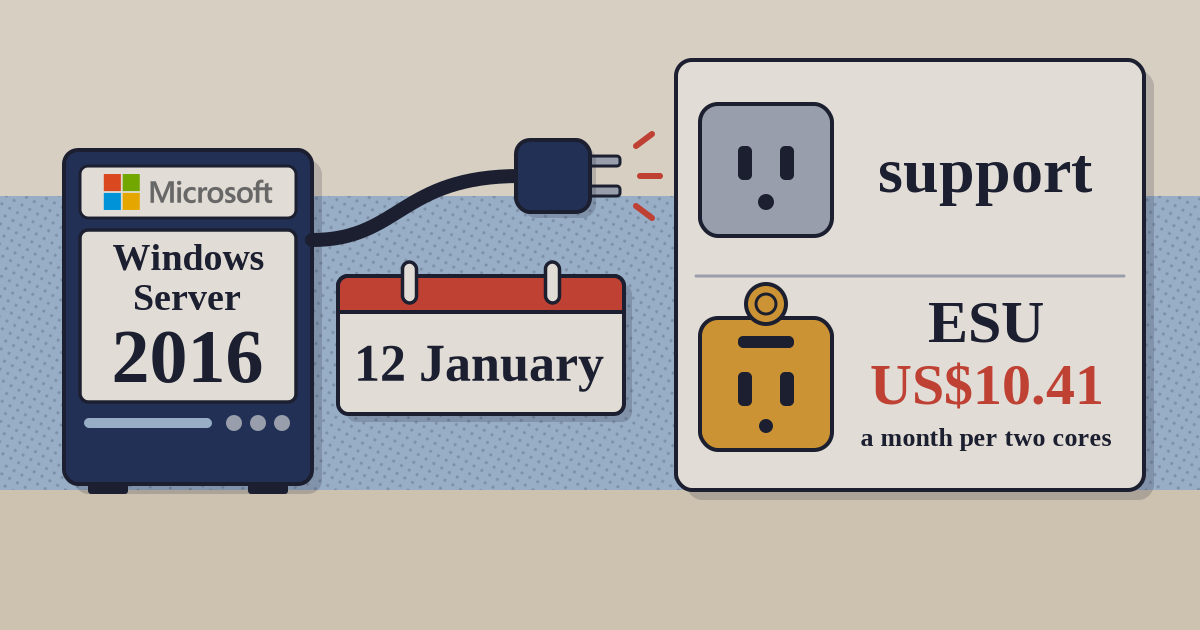
Windows Server 2016 leaves extended support on Tuesday 12 January 2027, 49 days from today, and the January security update is the last one that support includes.16 After that, monthly security updates go only to servers enrolled in Extended Security Updates (ESU), which Microsoft sells for three years, to 8 January 2030.2 Unlike Windows Server 2012, this release gets no free ESU in the cloud: “Windows Server 2016 ESUs are a paid offering in Azure.”2 Through Azure Arc, the published rate is US$10.41 a month per two cores for Standard edition and US$59.96 for Datacenter.3
Windows Server 2016 support ends on 12 January 2027; paid security updates stop on 8 January 2030
Microsoft’s dates for Windows Server 2016 and its Extended Security Updates, with the end dates of two versions it can upgrade to, August 2026 to October 2031
Show tableHide table
| Date | Event | Detail |
|---|---|---|
| 3 Aug 2026 | ESU can be set up in Azure | Windows Server 2016 ESU licences configurable in the Azure portal through Azure Arc |
| 13 Nov 2026 | Microsoft’s 60-day reminder | Windows message centre: plan to upgrade to Windows Server 2025 |
| 12 Jan 2027 | Extended support ends | The January 2027 security update is the last without ESU |
| 13 Jan 2027 | ESU year 1 starts | Billing for ESU through Azure Arc begins |
| 11 Jan 2028 | ESU year 1 ends | Year 2 runs from 12 January 2028 |
| 9 Jan 2029 | ESU year 2 ends | Windows Server 2019 leaves extended support the same day |
| 8 Jan 2030 | ESU year 3 ends | No further security updates for Windows Server 2016 |
| 14 Oct 2031 | Windows Server 2022 ends | End of extended support for Windows Server 2022 |
Source: Microsoft Lifecycle pages for Windows Server 2016, 2019 and 2022; Microsoft Learn; Windows message centre · as of 24 November 2026, 7:45pm IST · dates in US Pacific time
01What ends, and what ESU keeps
The date covers every edition, Datacenter, Essentials, MultiPoint Premium and Standard, and containers released with it.1 ESU is offered for Standard and Datacenter only. It delivers security updates rated Critical or Important and nothing else: no new features, no fixes on request, and technical support is not included.2 Microsoft says any Essentials feature that still works afterwards, Remote Web Access included, “should be treated as unsupported”.6
Software of the same vintage has already gone: Exchange Server 2016 left extended support on 14 October 2025, SQL Server 2016 on 14 July 2026 and Windows 10 Enterprise LTSB 2016 on 13 October 2026.21112
02What ESU costs
Microsoft sells ESU for servers outside Azure in two ways, and both need active Software Assurance, subscription licences, or licences supplied by a hosting provider under SPLA.2 Through Azure Arc, a server is connected to Azure and billed monthly, from 13 January, by the core: 16 cores at least for a physical server, or eight for a virtual machine at the Standard rate.24 A 16-core Standard host therefore costs US$83.30 a month, US$999.62 a year. On Datacenter, which covers every virtual machine on the host, it is US$479.66 a month.3
The other way is a yearly ESU licence through volume licensing, priced at “100% of full license price annually” in each of the three years. Year 2 and year 3 can be bought only with the years before them.2 Waiting saves nothing: sign-ups through Arc after an end-of-support date are billed back to the start of the term.3 Microsoft publishes no rupee price for either route.
Show tableHide table
| Route | Cost basis, as Microsoft publishes it | Conditions |
|---|---|---|
| ESU through Azure Arc | US$10.41 a month per two cores, Standard; US$59.96, Datacenter | Billed monthly from 13 January 2027; at least 16 cores a server, or 8 a virtual machine |
| ESU licences, volume licensing | 100% of the full licence price a year, in each of three years | Earlier years must be bought first; activation keys go on each server |
| Windows Server 2016 in Azure | Paid; not free, as it was for Windows Server 2012 | Microsoft says delivery details will follow |
| In-place upgrade | A licence for the target version | To 2019, 2022 or 2025, from installation media |
| No action | No charge | No security updates after the January 2027 release |
03What to do in 49 days
Start with the inventory: every physical host, virtual machine and cluster node on the release, with its edition, core count and roles. Then decide server by server. From installation media, Windows Server 2016 upgrades in place to 2019, 2022 or 2025, and “each Windows Server upgrade requires a separate license”. Failover clusters move one version at a time, and not every role supports an in-place upgrade.7 The target matters. Windows Server 2019 leaves extended support on 9 January 2029, the day ESU year 2 ends; 2022 runs to 14 October 2031 and 2025 to 14 November 2034.8910 Microsoft’s reminder recommends 2025.6
For servers that cannot move in time, ESU through Azure Arc has been configurable since 3 August. Install the Azure Connected Machine agent, version 1.62 or later. In the Azure portal, open Azure Arc, then Licenses, then Windows Server 2016 ESU licenses. Create a licence with the edition and the number of cores, confirming Software Assurance. Then pick the servers under Eligible resources and choose Enable ESUs. A licence can be created deactivated, so it bills nothing until it is switched on, and the updates arrive through whatever patching tool is already in use.45 Virtual desktops are the exception: Microsoft says to use activation keys there, not Arc.4
Sources
- Microsoft Lifecycle, Windows Server 2016 (support dates and ESU years) — undated page
- Microsoft Lifecycle FAQ, Extended Security Updates — last updated 11 November 2026
- Microsoft Azure, Azure Arc pricing (Extended Security Updates enabled by Azure Arc, for Windows Server 2016) — undated page
- Microsoft Learn, Prepare to deliver Extended Security Updates for Windows Server — last updated 5 October 2026
- Microsoft Learn, Deliver Extended Security Updates for Windows Server — last updated 5 October 2026
- Microsoft, Windows message centre: 60-day and 90-day reminders for Windows Server 2016 — 13 November 2026 and 14 October 2026
- Microsoft Learn, Plan your Windows Server upgrade (supported in-place upgrade paths) — last updated 14 April 2026
- Microsoft Lifecycle, Windows Server 2019 — undated page
- Microsoft Lifecycle, Windows Server 2022 — undated page
- Microsoft Lifecycle, Windows Server 2025 — undated page
- Microsoft Lifecycle, Exchange Server 2016 — undated page
- Microsoft Lifecycle, SQL Server 2016 — undated page
- Microsoft, Windows 10, version 1607 and Windows Server 2016: known issues and notifications (release health) — status as of 13 November 2026
Disclosure. TechBag is a software reseller: it earns when companies buy through it, including from vendors named here. The analysis is TechBag’s own; no vendor paid for or saw this piece before publication. Facts are labelled reported, TechBag count or our view. How the Journal works.
Keep reading